NOAA Weather radio
- 4.2
- Rating
- 100.00K
- Installs
- Free
- Price
 Analysis by App-foxy
NOAA Weather radio is a focused weather app from ArtStyle that I would describe as a listening tool rather than a complete replacement for every modern forecast service. Its central idea is simple: bring live weather-radio streams into a phone so I can hear official-style broadcast information instead of relying only on icons, temperature cards, or short text alerts. That narrow purpose gives it a clear identity, but it also means the app is most useful when I understand what it is designed to do and what it is not.
I spent time looking at it from the point of view of an ordinary phone user who wants dependable weather awareness without turning every forecast check into a research project. The experience is especially relevant for people who prefer spoken updates, follow changing conditions while working or traveling, or want a dedicated source to keep open during unsettled weather. At the same time, someone searching for detailed maps, long-range planning, or a polished all-in-one forecast dashboard may find the experience too limited.
What NOAA Weather radio actually offers
The app belongs to the weather category, and its store summary points directly to its main function: live weather radio streams. That distinction matters. I do not approach it as a conventional forecast app that revolves around hourly graphs, animated radar, or a large collection of lifestyle details. Its appeal comes from listening to weather information in a more continuous, broadcast-like way.
You May Also Like

 Blood Strike: 2.5 Anniversary
Blood Strike’s Loadouts Turn Every Drop Into a Tactical Gamble
A close look at Blood Strike’s custom loadouts: how fast access to signature weapons reshapes its battle royale rhythm, rewards preparation, and narrows the gap between fights.

 Pandora - Music & Podcasts
Pandora’s Music Is Easy to Start, but Harder to Recover
Pandora’s strength is its low-effort path from a seed to a station. Its weak spot is how much confidence it asks you to place in connection, setup, and quiet recovery.

 8 Ball Pool
 Is Built on Rivalries, Rematches, and Routine
A close look at the rivalries, rematches, shared routines, and unanswered safety questions that turn a quick pool match into a persistent mobile community.

 Samsung Music
’s Quiet Strength Is Playing What You Already Own
Its reach comes less from spectacle than from dependable access to a personal library. That simplicity is both the app’s strongest retention engine and its ceiling.

 AccuWeather: Weather Radar
AccuWeather Review: A Quick, Clear Forecast for Everyday Decisions
For everyday plans, the best forecast is the one you can understand quickly. AccuWeather makes rain timing, radar, and local conditions easy to act on, with a few trade-offs.

 Hill Climb Racing
Why Hill Climb Racing Still Turns Crashes Into One More Run
A tiny car, a bumpy hill and one more upgrade: Hill Climb Racing keeps resurfacing because its simple chaos makes every near-miss feel personal.
More From Our News Desk



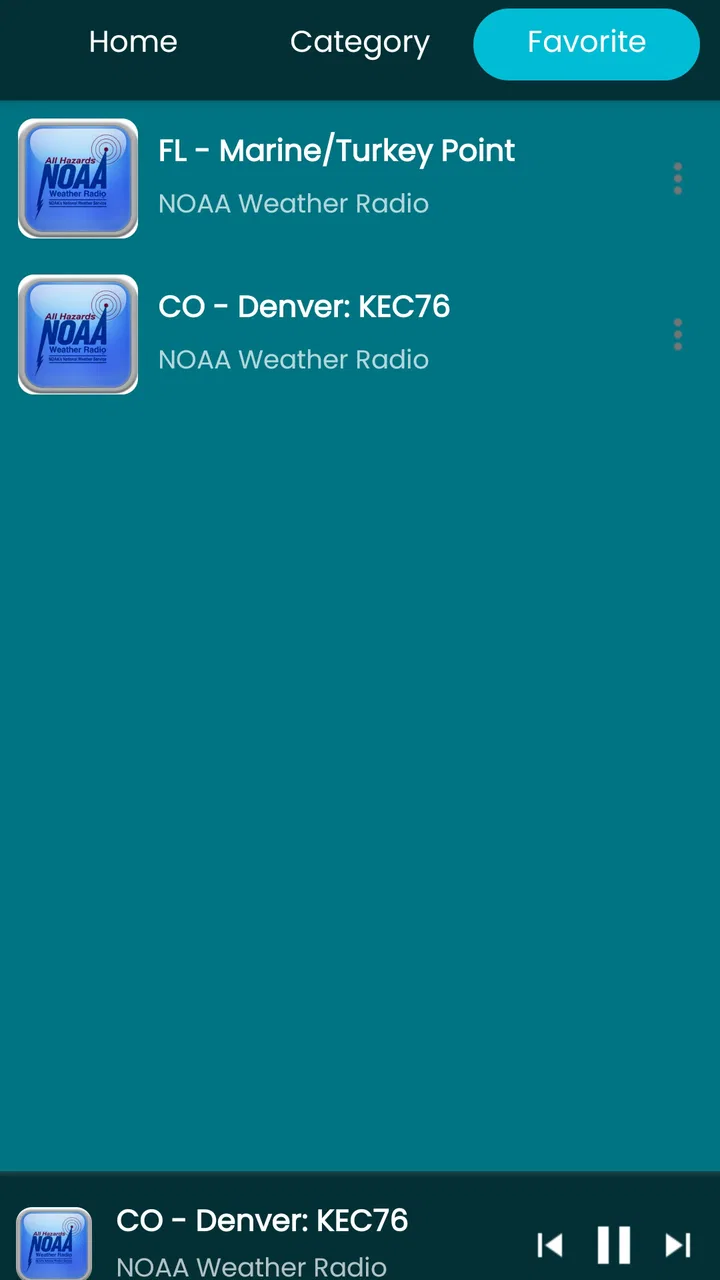
ArtStyle keeps the concept straightforward. Instead of making me interpret a row of symbols, the app is intended to let me hear a stream. For users who already understand the value of NOAA Weather Radio, that makes the purpose immediately clear. For newcomers, the important expectation is that this is an audio-centered experience, not simply another app with “NOAA” in its name and a standard forecast screen.
That focus can be useful in situations where I am busy with something else. I might be cooking, driving as a passenger, organizing equipment, or working outdoors and prefer to listen rather than repeatedly unlock my phone. Audio also gives weather information a different rhythm: I can hear a bulletin or update while keeping my attention on the task in front of me.
The app is free, so there is no purchase decision to make before trying it. That is the clearest value point here: I can test whether live weather-radio listening suits my routine without committing money. The free price does not automatically make it the best weather tool for everyone, but it lowers the risk of experimenting with a more specialized format.
It is rated for Everyone, which makes the basic concept accessible to a broad audience. The app was released in February 2020 and is currently at version 7.9.3, while Android users need at least Android 6.0. Those details make it usable on a wide range of phones, including devices that are not running the newest operating system.
How the listening approach changes everyday use
My biggest practical observation is that a radio stream works best as a background source, not as something I stare at continuously. With a typical weather app, I open the screen, scan the forecast, and close it. With this one, the natural workflow is different: start the stream when conditions matter, listen for relevant information, and leave it available while doing something else.
That makes it a good companion during a storm watch or while preparing to travel through changing weather. I can keep the phone nearby and use the spoken information as one layer of awareness. The trade-off is that listening takes time. If I only want to know whether it will rain at a particular hour, a conventional forecast card is usually faster.
There is also a useful difference between a broadcast and a personal forecast. A broadcast can provide context in a way that a single temperature number cannot. Hearing a weather update may help me understand that conditions are changing across an area rather than simply seeing one isolated prediction. However, the usefulness depends on the stream being relevant to my location and on me being willing to listen rather than skim.
A practical tip is to treat the app as a situational monitor. I would not open it every morning as my only source for planning an entire day. I would use a regular forecast service for a quick schedule check, then turn to NOAA Weather radio when I want ongoing audio information or when weather conditions deserve closer attention.
What I like about the free value
Because access is free, the app has a low-friction role in a larger weather routine. I can keep a standard forecast app for visual planning and use this one when audio is more convenient. That combination is more sensible to me than expecting one application to excel at every weather task.
The value is also strongest for people who dislike excessive visual clutter. Many weather apps compete for attention with maps, cards, alerts, advertisements, and layers of detail. A radio-focused tool can feel calmer because the main action is simply listening. If I already know that I prefer spoken information, the specialized design is more useful than a crowded dashboard.
Another non-obvious benefit is continuity of attention. A visual forecast usually gives me a snapshot. A live stream can remain part of the background while I move around. That is helpful when I am preparing for outdoor work and do not want to stop repeatedly to refresh a forecast. I still need to use judgment, but the audio format fits tasks where checking a screen is inconvenient.
The app’s current adoption also suggests that it has found an audience: it has more than one hundred thousand installs, with an average rating of 4.2 from around one thousand ratings and 277 reviews. I mention that context not as proof that it will suit me automatically, but as a sign that the concept is not limited to a tiny group of experimenters.
Where the experience can feel limited
The same specialization that gives the app its identity can make it feel incomplete beside a full weather platform. If I want a visual radar sweep, a detailed hourly breakdown, a multi-day planning view, or location-specific comparisons, a conventional forecast app will generally be the more efficient choice. NOAA Weather radio is not the tool I would choose for quickly comparing several destinations before a trip.
Audio also creates a discoverability problem. When I read a forecast, I can jump directly to the section that matters. When I listen, I may need to wait for the relevant information to come around or pay close attention so I do not miss it. That is not necessarily a flaw in the app; it is a natural trade-off of radio-style information. Still, it affects how convenient the experience feels when I am in a hurry.
Another limitation is that a live stream is not the same as a personalized notification system. I would not assume that simply opening the app replaces emergency alert settings or other official warning channels on my phone. For serious weather, I would keep multiple ways of receiving information rather than relying on a single app or stream.
There is a further practical consideration for mobile use: listening requires an active connection and can be less convenient when coverage is weak. I would be cautious about treating it as an offline resource during a remote trip. A downloaded map, saved forecast, or separate emergency radio may be more dependable in places where mobile data is unreliable.
These trade-offs do not make the app poor. They define its proper place. I see it as a focused listening option, not a universal weather command center. Users who judge it by the standards of a radar-heavy forecast app may be disappointed, while users who specifically want weather radio may appreciate the directness.
Useful routines for different situations
Imagine that I am getting ready for an outdoor job and the sky looks unsettled. I could use a normal weather app to check the current forecast, then start the radio stream while packing. If the broadcast discusses changing conditions in the area, I have more context while I work. I would still make the final decision based on the situation around me and any official warnings, but the app gives me a hands-free way to stay informed.
For travel, I would use it differently. Before leaving, I would check a map-based service for the route and expected conditions at the destination. During the journey, the radio stream could be useful when I want ongoing awareness without repeatedly typing new locations. This workflow avoids asking the app to do something it is not built to do while still taking advantage of its audio strength.
At home, the app could serve as a background source during a period of severe weather. I would place the phone where I can hear it, keep the volume at a sensible level, and continue using official alerts for urgent instructions. The important insight is that the app is most valuable when it complements attention, not when it becomes the only thing I trust.
For someone with hearing loss or anyone who cannot comfortably follow audio, the format may not be a good match. A text-first weather service with clear visual warnings would be more appropriate. Likewise, people who want a quiet, glanceable forecast may find a live stream unnecessarily slow.
Parents and families may appreciate that the app carries an Everyone age rating, but I would still explain to younger users that hearing a broadcast is not the same as understanding what action to take. Weather information needs context, especially when conditions become dangerous. The app can provide a source of information, while adults remain responsible for interpreting it appropriately.
How it compares with usual weather alternatives
Compared with a standard weather app, NOAA Weather radio is more specialized and less visual. The usual alternative wins when I need speed: current temperature, precipitation timing, forecast summaries, and map-based detail can be easier to scan. It also tends to fit trip planning better because I can compare time periods and locations at a glance.
Compared with a general news or weather website, the app offers a more direct listening routine. I do not have to navigate through articles or video to reach a weather update. That simplicity is valuable when my goal is specifically to hear a stream rather than browse a broader information service.
Compared with a physical weather radio, the phone app is more convenient to carry because it uses a device I already have. The phone format may be attractive for casual monitoring, but I would not treat it as a complete substitute for dedicated emergency equipment in every circumstance. A phone depends on its battery, connection, and normal operation, so preparedness-minded users may still want a separate backup.
Compared with a paid weather application, the free access here is an important advantage for a narrow use case. I would only consider paying for another service if I needed features that this listening-focused approach does not provide, such as richer visual forecasting or more advanced planning tools. Since this app is free, its value is best judged by whether the stream earns a place in my routine, not by a complicated cost calculation.
Who should install it, and who should skip it
I would recommend trying it if I wanted live weather audio, preferred listening to reading, or needed a background source while working. It is also a sensible option for users who already have a favorite visual forecast app but want another way to follow weather when screen checking becomes inconvenient.
The app is particularly well suited to a person who understands that weather information comes in layers. A visual forecast helps with planning, while a live stream can help with continued awareness. Used together, those tools can be more practical than forcing one app to handle every situation.
I would skip it if my main requirement were a fast glance at hourly conditions, detailed radar, or a highly personalized forecast dashboard. I would also look elsewhere if I needed dependable offline access or if audio information was difficult for me to follow. In those cases, a text-and-map service is likely to deliver more useful value, even if it is less focused.
Before settling on it, I would run a simple personal test: use it during one ordinary weather check and one situation where I am busy away from the screen. If the audio stream helps me stay aware without becoming distracting, it has a clear role. If I keep muting it because I only want quick numbers, that is a strong sign that another type of weather app fits better.
My verdict on the free download
NOAA Weather radio is worth trying when the phrase “weather information” means listening to a live stream rather than scanning a forecast page. ArtStyle has a clear, specialized concept, and the fact that it is free makes exploring that concept easy. I like it most as a companion to a visual forecast service, especially during changing conditions or tasks where repeatedly checking a screen is inconvenient.
My recommendation is therefore conditional but positive. Install it if you want a focused audio source and are comfortable with the trade-off between broadcast context and quick visual lookup. Skip it if you expect maps, detailed personal forecasting, or a full emergency-preparedness system in one place. For the right listener, the app provides useful value without a purchase barrier; for everyone else, its narrow purpose will be apparent quickly.
In the end, I would keep it as a practical secondary weather tool rather than my only source of information. Its strength is not the number of features, but the change in how weather reaches me. When that listening format matches the way I work, travel, or monitor unsettled conditions, it becomes genuinely handy. When I need precision at a glance, the usual alternatives remain the better choice.
FAQs for NOAA Weather radio
01What features does the NOAA Weather Radio app offer?
The NOAA Weather Radio app provides real-time weather alerts, including severe weather warnings, radar images, and forecasts. Users can access weather alerts for multiple locations, customize notifications, and listen to live NOAA Weather Radio broadcasts. The app also features interactive maps for tracking storms and other weather events.
02Is the NOAA Weather Radio app free to use?
The NOAA Weather Radio app may offer a free basic version with limited features. However, to access premium features such as advanced alerts and ad-free experience, users might need to purchase a subscription or make in-app purchases. Check the app's download page for detailed pricing information.
03How accurate are the weather alerts provided by the app?
The NOAA Weather Radio app sources its data directly from the National Oceanic and Atmospheric Administration, ensuring a high level of accuracy. However, while the app strives to deliver timely and precise alerts, users should use it as a supplementary tool alongside other weather information channels for comprehensive coverage.
04Can I customize the types of alerts I receive on the app?
Yes, the app allows users to customize the types of weather alerts they receive. You can choose specific alerts such as tornado warnings, flood warnings, or severe thunderstorm alerts. Additionally, users can set alerts for multiple locations, ensuring they receive the most relevant weather information.
05Does the NOAA Weather Radio app require internet access to function?
The app requires internet access to fetch real-time data, updates, and live NOAA Weather Radio streams. However, some features, like previously downloaded alerts or forecasts, might be accessible offline. For optimal functionality, ensure a stable internet connection when using the app.
Pros
- Real-time weather alerts and updates.
- User-friendly and intuitive interface.
- Covers a wide range of locations.
- Customizable alert settings.
- Reliable and accurate forecasts.
Cons
- Limited offline functionality.
- Ads can be intrusive at times.
- Subscription required for premium features.
- Battery drain with continuous updates.
- Occasional delays in alert delivery.

NOAA Weather radio
Gallery